
VAT invoices from rentals. Send to KSeF with one click
Stop manually copying data onto invoices. Toolero generates invoices from rentals, fills in buyer details and sends to the National e-Invoice System automatically.
7 days free. No credit card required.
Invoicing your rentals is chaos?
Manual invoicing, no KSeF integration and lost documents - sound familiar?
Manual data entry
You copy data from the rental agreement onto an invoice. Each invoice takes 10-15 minutes and risks errors in tax IDs or amounts.
No KSeF integration
The e-invoice mandate is approaching fast, yet you're still emailing or printing invoices. You have to log into a separate system.
Invoices lost in paperwork
Clients ask for duplicates while you search through folders. No central archive and no instant PDF access.
Corrections are a nightmare
Error on an invoice sent to KSeF? Manual correction creation, re-submission and number tracking. It doesn't have to be this hard.
How Toolero solves invoicing?
Full invoicing integrated with rentals and the National e-Invoice System
Invoice from rental in 1 click
Seller, buyer, line items and totals - all from the rental. No manual copying.
Automatic KSeF submission
Invoice goes to the National e-Invoice System with one click. Auth token, test and production environments - all in settings.
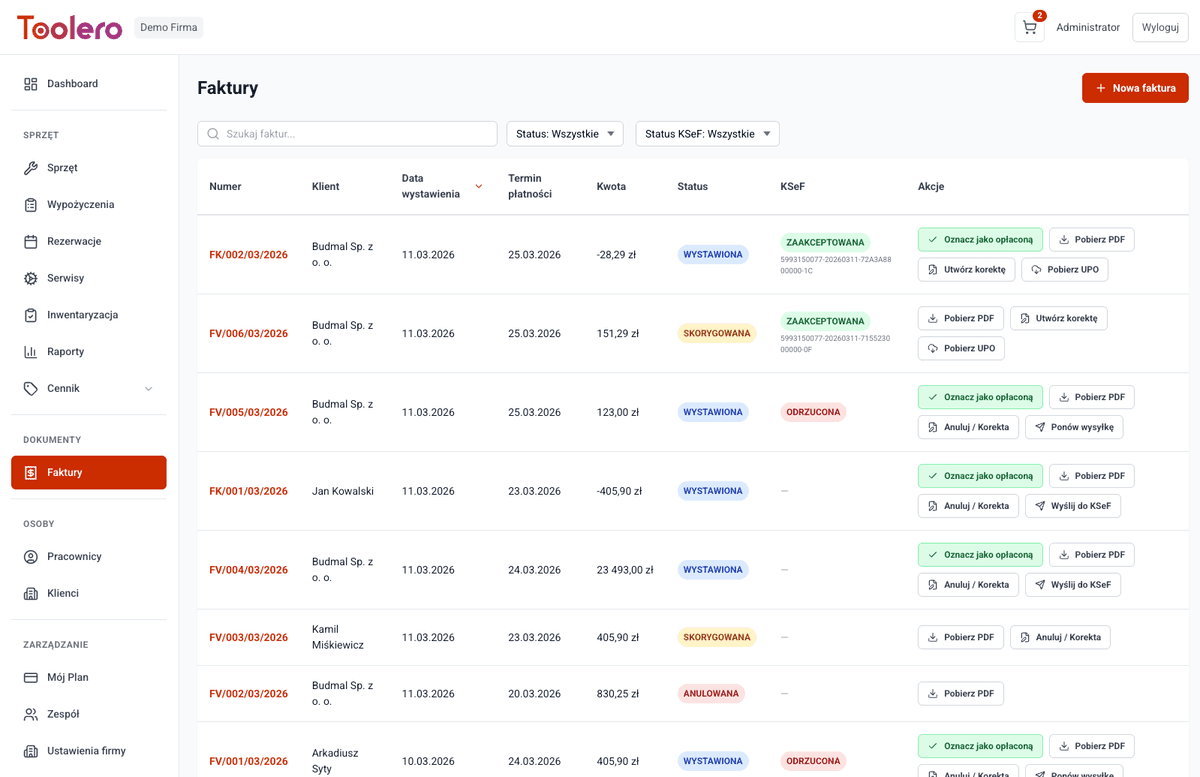
Real-time KSeF status
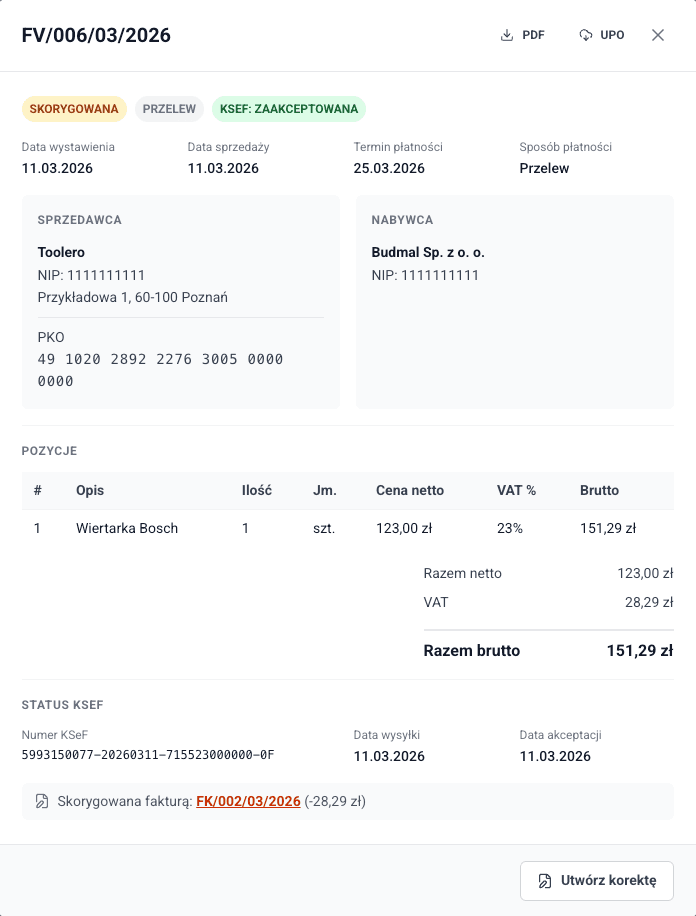
See immediately whether the invoice is sent, accepted or rejected. KSeF reference number and UPO available in details.
Corrections with KSeF integration
Correction invoices created from the original. Automatically linked and sent to KSeF.
Complete invoicing module in one system
Everything you need for rental invoicing - no external software required
- Generate invoices directly from rentals
- Send to KSeF from invoice list or details
- KSeF statuses: Sent, Accepted, Rejected, Error
- Download UPO (Official Proof of Receipt)
- Correction invoices with automatic linking
- PDF export with KSeF reference number
- Auto-fill buyer data from customer database
- Status management: draft, issued, paid, cancelled
How invoicing works in Toolero?
4 simple steps from rental to e-invoice in KSeF
Create a rental
Rent equipment to a customer as usual. The system remembers all data needed for the invoice.
Generate an invoice
Click "Issue invoice" on the rental. Seller, buyer and line items fill in automatically.
Send to KSeF
With one click the invoice goes to the National e-Invoice System. Status updates in real time.
Download UPO and PDF
After KSeF acceptance, download the Official Proof of Receipt and PDF with reference number.
Toolero vs manual invoicing
Compare the invoicing process with KSeF integration
Frequently asked questions about invoicing and KSeF
Is KSeF integration mandatory?
The Polish National e-Invoice System (KSeF) becomes mandatory in 2026. Toolero lets you prepare now - you can test submissions in the KSeF test environment with no consequences.
How do I configure KSeF in Toolero?
Go to Settings → KSeF, enter your company tax ID, paste the auth token from the KSeF portal and choose environment (test or production). Setup takes 2 minutes.
What happens when KSeF rejects an invoice?
The system automatically marks the invoice as rejected and shows the error reason. You can fix the data and retry with one click.
Can I issue correction invoices?
Yes. Correction invoices are created from the original invoice, automatically linked to the source document. The correction also goes to KSeF.
Can I use invoicing without KSeF?
Yes. KSeF integration is optional. You can issue VAT invoices, generate PDFs and manage statuses without activating the KSeF module.
Is invoice data secure?
The KSeF auth token is encrypted and stored securely. Communication with KSeF is over HTTPS. Your invoice data never leaves encrypted connections.
What invoice formats are supported?
Toolero generates invoices in FA(3) format compliant with the KSeF schema, plus downloadable PDFs. The KSeF reference number is automatically added to the PDF after acceptance.
Ready for automated invoicing with KSeF?
Create a free account, set up KSeF in 2 minutes and issue e-invoices effortlessly.
Try for free - 7 daysNo credit card required. Full access to invoicing and KSeF.