
Automatic email notifications for every stage of the rental
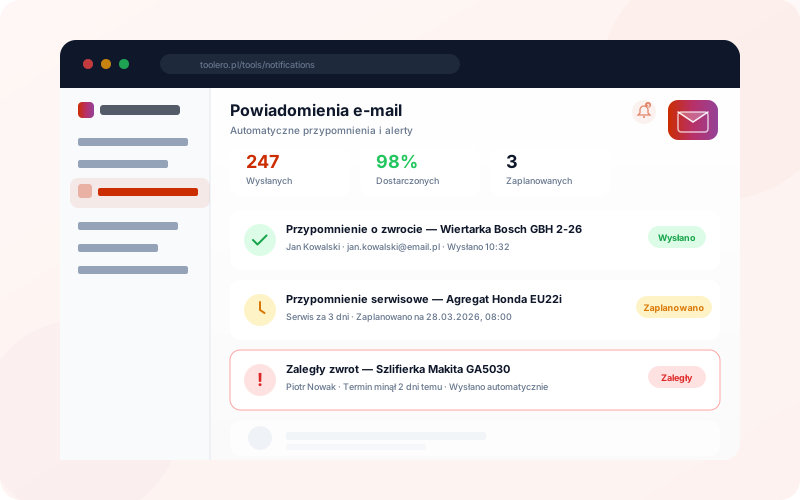
Service reminders, return reminders, overdue alerts and document expiry notifications. Configure once - the system sends for you. Professional email templates.
7-day free trial. No credit card required.
Manual customer notifications cost time and nerves
Four most common problems of businesses without automated notifications.
Customers forget about returns
Without a reminder, customers don't remember the return date. Equipment comes back late, and you lose the chance for the next rental.
Manual calls and email writing
Every day you spend hours on phone calls and manually sending reminders. That's time you could spend serving customers.
Missed service deadlines
Nobody keeps track of when equipment is due for inspection. Services get delayed and equipment breaks down - costly repairs instead of cheap inspections.
Overdue items caught too late
You find out about a late return only when the next customer in line asks where the equipment is. Too late to react.
Automatic notifications at every stage
Key types of email notifications in Toolero.
Service reminders
The system automatically reminds you of upcoming equipment services and inspections. Keep your fleet in perfect condition.
Return reminders
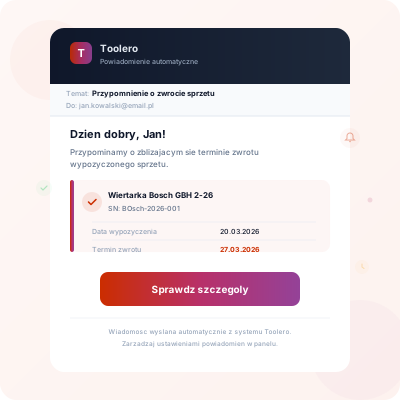
The system sends a reminder before the rental end date. The customer knows when to return the equipment - fewer delays.
Overdue alerts
When the return date passes, the system automatically notifies the customer about the delay. Faster reaction, fewer losses.
Document expiry alerts
When a document is about to expire (insurance, technical inspection), the system automatically sends an alert. You never miss an important deadline.
Email notification features
Everything you need for automatic customer communication.
- Automatic reminders for upcoming equipment services
- Reminders before the equipment return deadline
- Overdue return notifications sent automatically
- Document expiry alerts (insurance, inspections)
- Professional templates in consistent Toolero design
- Automatic sending schedule - no manual intervention needed
How to set up notifications
Three simple steps to automatic email notifications.
Enable notifications
Activate the notification types you want to send: service reminders, return reminders, overdue alerts and document expiry notifications.
Customize templates
Templates are professionally designed with rental details auto-filled. Professional emails without extra configuration.
Done - the system sends
From now on, notifications are sent automatically. Customers are kept informed, and you save time.
Toolero vs manual notifications
Compare Toolero's automatic notifications with traditional methods.
Frequently asked questions
Which plan includes email notifications?
Email notifications are available from the Business plan. The Business plan includes all notification types and professional templates.
Can I customize the notification content?
Notifications use professional templates that automatically include rental details. The templates are ready to use out of the box.
When are return reminders sent?
Reminders are sent automatically before the return deadline. You can configure how many days in advance the customer should receive a reminder.
Does the customer receive overdue notifications automatically?
Yes. The system automatically detects late returns and sends a notification to the customer. You don't need to manually monitor deadlines.
Can I disable individual notification types?
Yes. Each notification type (service reminders, return reminders, overdue alerts, document expiry) can be enabled or disabled independently in the settings.
Start sending notifications automatically
No more manual calls and writing emails. Configure once - the system notifies for you.
Try for free7-day free trial. No credit card required.