
Stocktake in hours, not days
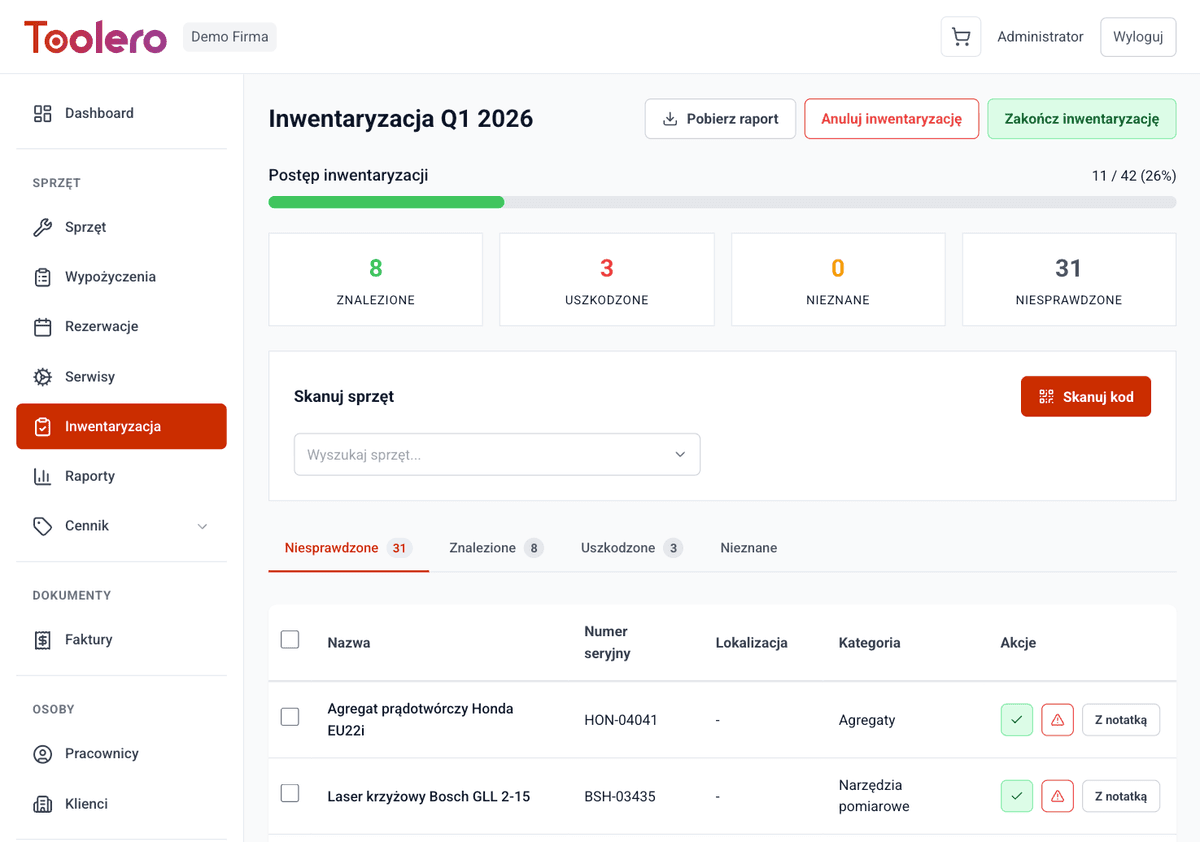
Create an inventory session, scan equipment with QR codes and instantly see differences between actual and system state. Report ready immediately - no paper or spreadsheets.
7-day free trial. No credit card required.
Why is stocktake a nightmare?
Four most common problems of companies doing manual inventory.
Paper-based stocktake takes days
Manually listing equipment, comparing against records, re-entering into Excel. A process that should take hours drags on for days.
No idea what's missing
No information about which equipment disappeared, what's damaged, or what's simply in another location. You discover shortages by accident.
No inventory history
No archive of completed stocktakes. You don't know when something went missing or what the situation looked like before.
Stocktake blocks operations
Everything stops because people are counting equipment. No checkouts or returns - the company loses money due to downtime.
Inventory under control
Four key features of Toolero's inventory module.
Inventory sessions
Create sessions, start and close stocktakes. Full control over the process.
QR code scanning
Scan QR codes with your phone - equipment automatically lands on the inventoried list. No manual entry.
State comparison
System automatically compares actual (scanned) state with the database. Instant results.
Difference report
Generate reports of shortages and damages. Export to PDF with one click.
Inventory module features
Everything you need to conduct equipment stocktake.
- Inventory sessions (start/stop)
- QR code scanning during stocktake - no manual entry
- Difference report: shortages and damages
- Archive of completed inventory sessions
- Export results to PDF
- Available from the Business plan
How inventory works
Four simple steps from start to close of stocktake.
Create session
Name the session and select location to start counting.
Scan equipment
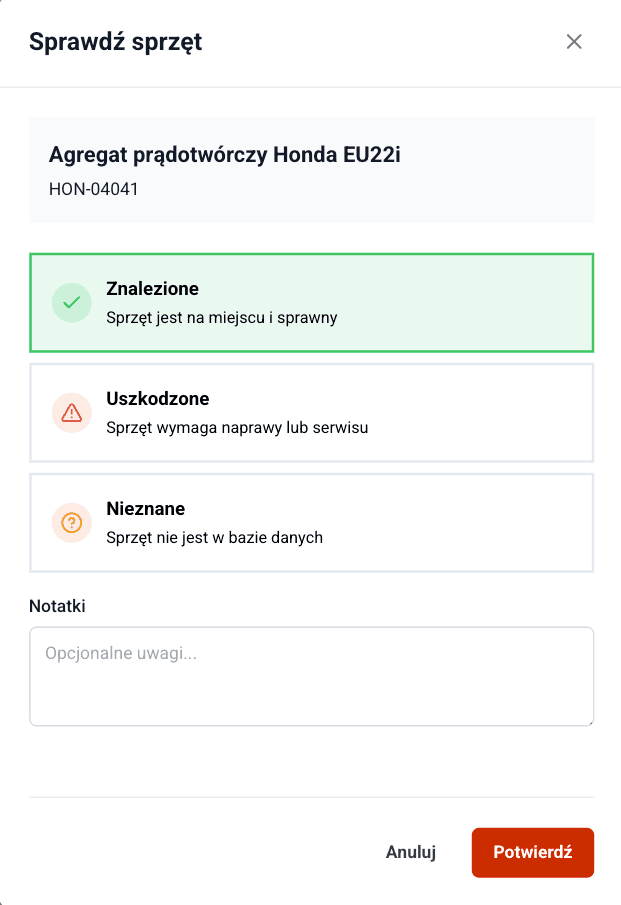
Employees scan QR codes on equipment with their phones. Each scanned item lands on the list.
Check differences
System compares scanned items with database records. You instantly see shortages and damages.
Close stocktake
Generate difference report, export to PDF and close the session. Results are saved in history.
Toolero vs paper & Excel
Compare Toolero inventory with traditional methods.
Frequently asked questions
How do I start an inventory in Toolero?
Go to the Inventory module, create a new session and click Start. Employees can immediately start scanning QR codes on equipment.
Do I need a special QR scanner?
No - a regular smartphone with a camera is enough. Toolero's web app reads QR codes directly from the browser.
What if equipment doesn't have a QR code?
You can search for equipment manually by name or number and add it to the inventoried list. However, we recommend attaching QR codes - it significantly speeds up the process.
Which plan includes inventory?
The inventory module is available from the Business plan. You can create sessions, scan QR codes and generate difference reports.
Is inventory history saved?
Yes - Toolero stores the archive of all completed inventory sessions. You can review previous stocktake results at any time.
Start inventorying faster
No more paper lists and days of counting. Try Toolero inventory.
Try for free7-day free trial. No credit card required.