
No more double bookings and phone calls about availability
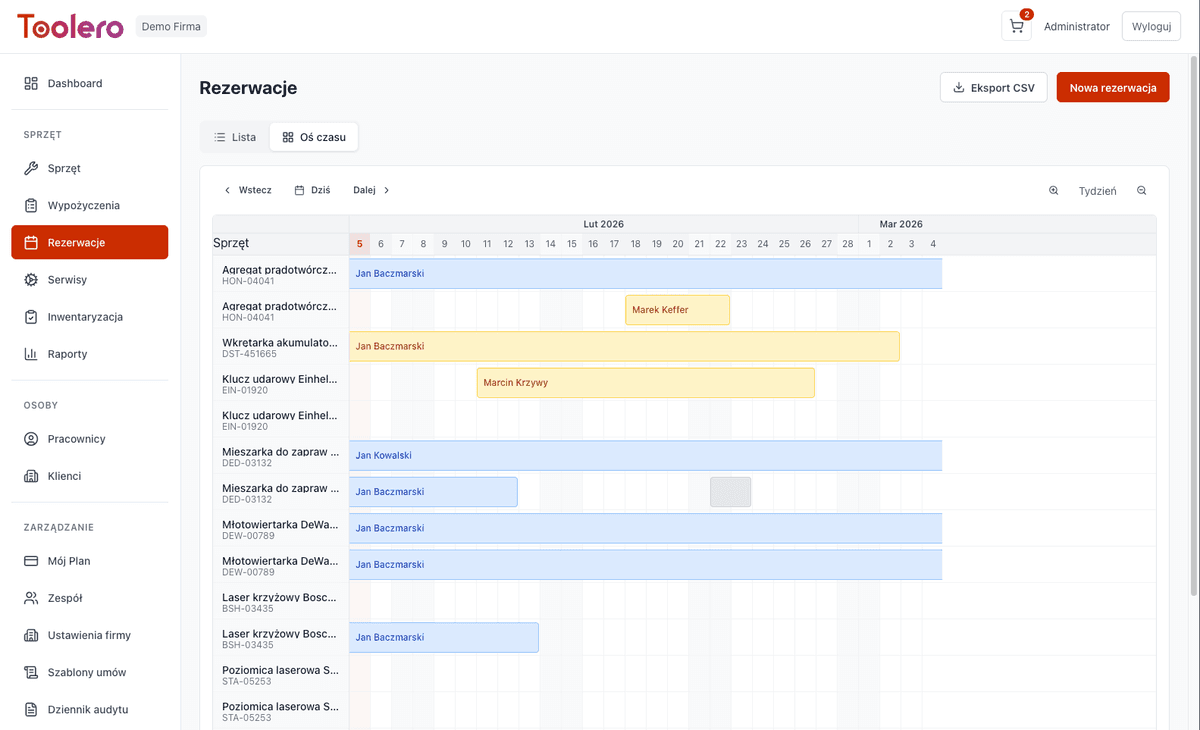
Availability calendar with automatic conflict detection. Employees and customers reserve equipment online, and you convert reservations to rentals with one click.
7-day free trial. No credit card required.
Without a reservation system you lose time and customers
Three most common problems of companies without equipment reservation system.
Double bookings
Same equipment promised to two people at the same time. Conflicts, unhappy customers and operational chaos.
No availability visibility
You don't know what's available without checking in person. Customers wait for answers while you search through spreadsheets.
Phone-based booking
Reservations via phone, SMS, email. Information gets lost, there's no single source of truth about availability.
No reservation history
You don't know which equipment is most frequently reserved and which sits idle. No data for planning purchases and rotation.
Reservations under control
Four key features of Toolero's reservation system.
Availability calendar
Visual availability overview for each piece of equipment. Daily, weekly and monthly views.
Conflict detection
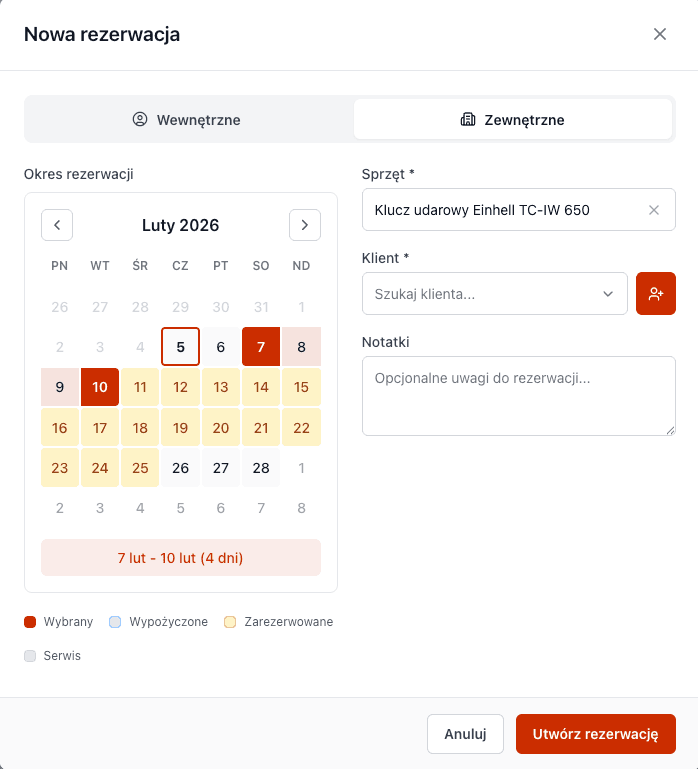
System automatically warns about overlapping reservations. No more double bookings.
Conversion to rental
One click to convert a reservation into an active rental. No data re-entry needed.
Lead time & planning
Book in advance. Plan equipment utilization days and weeks ahead.
Reservation system features
Everything you need to manage equipment reservations.
- Full status flow: pending → confirmed → in progress → completed
- Internal reservations for employees
- Reservations for external customers
- Automatic conflict alerts for overlapping dates
- One-click reservation to rental conversion
- Availability timeline with multi-equipment view
How reservations work
Three simple steps from reservation to rental.
Check availability
Open the availability calendar and see which equipment is free on your desired dates.
Create reservation
Select equipment, person and dates. System will check for conflicts and create the reservation.
Convert to rental
When the time comes, convert the reservation to a rental with one click.
Toolero vs other methods
Compare Toolero's reservation system with alternatives.
Frequently asked questions
What happens when there's a reservation conflict?
The system automatically detects conflicts and displays a warning. You can decide whether to create the reservation anyway (e.g., as pending) or choose a different date.
What's the difference between a reservation and a rental?
A reservation is a planned future use of equipment. A rental is an active checkout. You can convert a reservation to a rental with one click when the time comes.
Which plan includes reservations?
The reservations module is available from the Business plan. Pro and Enterprise plans offer additional features like the advanced timeline view.
Can customers book equipment themselves?
Currently reservations are created by operators in the system. We're planning a customer portal with self-service booking in future versions.
How do I reserve multiple tools at once?
Each reservation covers one piece of equipment - this lets the system precisely detect scheduling conflicts. Creating another reservation takes just seconds, and the calendar immediately shows updated availability.
What happens to a reservation after its date passes?
The reservation stays in the system with its current status (pending or confirmed) until you convert it to a rental or cancel it. This gives you full reservation history and control over every step.
Start managing reservations
No more double bookings and chaos. Try Toolero.
Try for free7-day free trial. No credit card required.