
Everything a rental business needs
From reservations and checkouts to settlements, invoices, roles and reports. See what the system does for you - and dive into any feature.
No card - 7 days free
Equipment & records
Your whole fleet in one record: from a serialized item to equipment counted by quantity and consumables. You always know what you have, where it is, what condition it is in and whether it is ready to work.
You keep every item as its own record with a serial number, QR code, status, photos, purchase data and location. The full history of each unit is at hand, so no equipment gets lost in limbo and you never have to remember where it last was.
Small and bulk equipment - straps, bolts, helmets - you count by quantity instead of per item, in your chosen unit. You see total, available, damaged and retired stock, so you stay on top of inventory that cannot be tracked by individual serial numbers.
You define an equipment type once - default rate, rental unit, deposit, category and photo - and every linked item inherits those settings. Adding another unit takes a moment, and your pricing and data stay consistent across the whole fleet.
You generate QR codes, PDF and thermal ZPL (Zebra) labels and NFC tags, one at a time or in bulk. You identify any item with a single scan - by phone or reader - instead of searching by description or retyping numbers by hand.
You track wear parts - filters, straps, inspections - per item, and the system schedules service and signals readiness by color: green, amber, red. A company dashboard shows what needs action before the equipment lets you down on site.
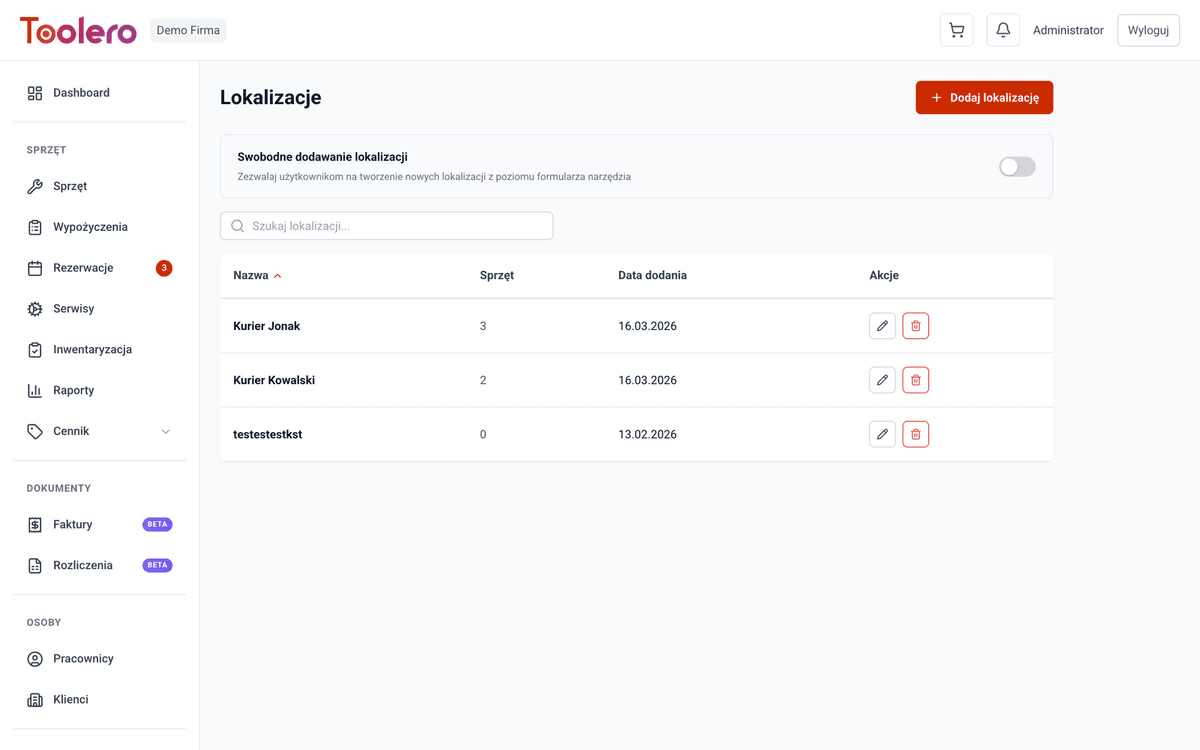
You organize equipment by warehouses, branches and zones, and a QR scan instantly assigns it to a new location. A full movement history tells you who moved each item, when and where - no more wondering which site the generator is on.
A Gantt-style view shows the occupancy of the whole fleet and of a single tool: rentals, reservations and service on one timeline. The system catches overlapping dates itself, so you plan checkouts without promising the same item to two customers.
Rentals
The full checkout and return cycle - one item or many at once - with automatic pricing, deposits and extensions. This is the core of the system: less clicking and retyping between handing out equipment and settling the bill.
One rental is any number of tools handed out together in a WYP- group: responsible person, dates, customer or employee, deposit, delivery method and add-on services. The system flags conflicts with reservations right away, so you will not hand out equipment promised to someone else.
You hand out equipment after scanning a code, without digging through a list. You identify the item by serial number, QR code, barcode or NFC tag, so the counter moves fast even with a queue and a large fleet.
You accept a return one by one, per whole transaction or in bulk, and set the condition right away: good, minor damage, major or lost. The late fee is calculated automatically on return, so you do not have to work it out by hand or forget it.
You extend a rental by more days or to a chosen date, for a single item or the whole transaction. The system recalculates the cost and checks whether the equipment is free for the new period, so an extension will not clash with someone reservation.
You set the deposit amount at checkout, mark it paid or unpaid, and settle it when the equipment comes back. The deposit makes sure expensive gear returns, and you keep a clear record of how much you took and from whom - no scraps of paper.
Reservations
You block equipment for future dates without risking a double booking, and when the customer comes to collect, you turn the reservation into a rental in one move. The calendar always shows what is genuinely free.
You reserve equipment for a chosen period in a RES- group and assign a customer, while the system checks for clashes with other reservations and rentals. You will not double-book the same item by mistake - at most you override it deliberately.
You check in real time whether a given item is free in the period you need, with details of any clash. You answer the customer on the spot instead of promising to "check and call back" and risking that the slot is already taken.
You turn a reservation into an active rental in one click, keeping the dates and customer details. Nothing gets retyped at collection, so what you agreed at booking flows straight into the transaction and on into the settlement.
A calendar view shows the fleet availability with reserved periods and date clashes marked. Instead of guessing from a list, you see at a glance when equipment is free and when it is already promised to someone else.
Returns & protocols
A return documented so there are no arguments: a field worker photographs the condition, a manager reviews the damage, and a signed PDF protocol closes it all. Fewer disputes over who scratched the equipment.
A field worker reports the return of an active rental with up to five condition photos, notes and an optional signature. They do not finalize it themselves - it goes to the manager for approval, so you have the equipment condition documented before anyone takes it back into the warehouse.
The manager reviews the photos, sets the condition - good, minor, major damage or lost - and adds inspector notes. Only after their approval is the return processed, so any deduction from the deposit rests on evidence, not on someone word.
You generate a formal return protocol with a signature, linked to the rental group, recording who handed out and who received the equipment, plus an IP address. You get an evidentiary document in case of a dispute, not just a note in the system.
Service & inspections
You plan maintenance, repairs, calibrations and inspections with costs and a full history. Equipment never gets lost in the repair shop, and mandatory inspection deadlines do not slip past you.
You schedule maintenance, a repair, calibration or inspection with a date, type, estimated cost and contractor. Service stops being something you "remember" - it has a deadline and an owner, so equipment reaches the shop before it breaks down.
You run each service through statuses from planned, through in progress, to completed or cancelled, and close it with the actual cost and notes. You always know what is in the shop and how much it really cost you.
You see inspections planned for the coming days, ordered by date. You prioritize repairs ahead of time instead of scrambling when a machine drops out of circulation mid-season or right before a big rental.
A full service history for every item - costs, contractors and dates of all repairs - in one place. You see which unit racks up the most cost and when it stops paying off, instead of pouring money into endless repairs.
Pricing & quoting
A flexible price list instead of one rigid rate: hour/day/week/month ladders, discounts, add-on services, delivery, seasonal rules and penalties. The price is calculated once and stays consistent from the quote through the rental to the settlement.
You set cumulative rates where a longer period comes out cheaper - from a quarter-hour, through a day and a week, to a month, net or gross with your own VAT rate. The customer gets a fair price for a longer rental, and you do not work it out in your head.
You set discount thresholds based on the number of items rented plus a fixed percentage tied to a specific customer. The system applies both automatically when creating a rental, so a regular always gets their terms and you do not have to remember them.
You add services such as delivery, insurance or an operator to a rental - as a flat or percentage charge. Delivery classes with a per-trip capacity work out how many trips are needed, so you price transport for real, not by guesswork.
You set variable prices for defined periods - a surcharge or a percentage discount with an application priority. In peak season you earn more, and in the quiet months you draw customers in more easily, without manually swapping the price list every few weeks.
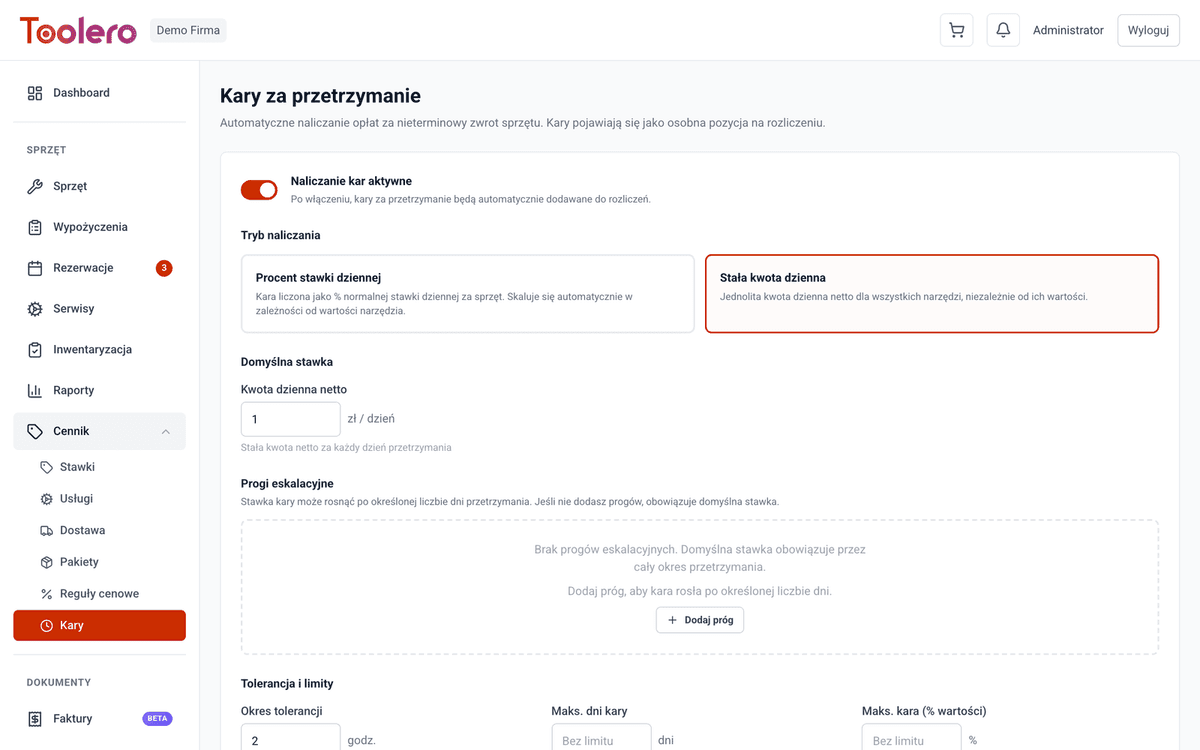
For a late return the system charges a fee itself - a daily rate or a percentage, with a grace period, a day cap and tiered charges for successive days. The customer knows the deadline means something, and you do not have to chase surcharges or count them by hand.
The calculator shows the price breakdown for a chosen model and rental time, step by step along the ladder, net or gross. You give the customer a concrete figure on the spot and know exactly what it is made of before you create the rental.
Settlements & invoices
The path from a closed rental to a paid KSeF invoice, all in one place: a settlement with the amount due, a VAT invoice, and submission to KSeF with the official receipt. No retyping data between the rental and accounting.
You generate a settlement from a rental that pulls together the base rental, services, delivery, late fees and damage deductions into one document, with statuses from draft to settled. The amount due adds up on its own, from exactly what happened.
You issue a VAT invoice from a settlement in one click or by hand, with automatic per-company numbering. You also handle corrective and zeroing invoices and PDFs, so your bookkeeping is complete, not just "issue it and sort out the rest yourself".
You send an invoice to Poland National e-Invoice System (KSeF) in the FA(3) format, check its status, download the receipt and retry failed submissions, with the reference number landing on the PDF. Mandatory KSeF is handled inside the system, no copying invoices into a separate tool.
You export settlements in bulk to CSV with filters by date, status and customer, and the system marks exported items. Your accountant gets a ready file, and you do not send the same thing twice or retype amounts off the screen.
Stocktaking
A periodic physical count of the whole fleet with scanning, a shortage list and automatic follow-up actions. After a session you really know what is in stock and what has gone missing, instead of guessing from records that no longer match.
You open a count session, optionally narrowed to a location or range, and track in real time which items are already checked. Stocktaking stops being a one-off scramble on paper - you get a controlled process with a clear status.
You scan a QR code or type a serial number and mark the item as present, with a timestamp and the person. The count goes fast and without mistakes, and every item gets a status: checked, unchecked, damaged or lost.
You get a list of equipment not found in the count, with ready actions: mark as lost or flag for clarification. Shortages surface right after the session, not only when someone urgently needs the equipment.
You close the session with editing locked and generate a PDF report: present, missing and damaged equipment with a summary. You get a document for the archive and for talks with the team or insurer, not just numbers that vanish when you close the screen.
Customers & CRM
An organized customer base with automatic contractor verification, encrypted storage of sensitive data and a history of cooperation. Less legal risk and a sounder decision on whether to lend at all.
You keep business and individual customers with contact data, rental history and autocomplete, with filters and pagination. At the next rental you see straight away who the customer is and how the cooperation has gone so far.
Before you hand out equipment, one click checks the contractor VAT status and the bankruptcy register, and the system adds a trust flag with an expiry. Less risk that expensive gear ends up with an insolvent company - you decide on data, not on a hunch.
The system scores a customer reliability based on rental history - how they returned equipment and paid before. For both regulars and new customers you decide more easily whom to give a higher limit or deposit, and whom to lend to more carefully.
You store the national ID and document number encrypted and shown masked, and revealing them requires a reason and goes into a full audit trail: who, when, why and from which IP. A hard GDPR argument, not a loose text field with sensitive data.
You keep a register of partners - subletting, resellers, service providers - with statistics, cooperation history and an audit trail. You know how much equipment went through intermediaries and how you settle with them, instead of keeping it in a separate spreadsheet.
Contracts & documents
Rental contracts generate automatically from templates filled with rental data, and the customer signs them electronically on site or remotely. Your full equipment documentation lives in one place, not in binders.
You design contracts in an editor with dynamic fields - customer name, dates, prices, terms - with versioning, a preview on real data and publishing. You lay a contract out once and it then fills itself for every rental, no copying in Word.
You automatically fill a template with the data of a specific rental - single or multi-item - and generate an HTML and PDF preview. The system verifies the document integrity and confirms it was not altered along the way, so you are certain what the customer signed.
The customer signs the contract with a finger on a tablet or phone at checkout, or remotely via a link with an OTP code sent by email. It is a standard (SES) electronic signature with a full evidence trail - person, date and IP address - so you skip printing and scanning paper.
To each item and each rental you attach manuals, certificates, warranties, invoices and service reports by drag and drop. Everything sits safely in the EU cloud and is at hand when a customer or an inspector asks for an equipment document.
Team & permissions
You control who sees and can do what: roles, permissions set separately in each module, a full audit log and GDPR compliance. A field worker will not reach the invoices, and you keep a trace of every change.
For each role you set access separately in every module - none, read or full - and turn whole modules on or off. A worker sees only what their job needs, while sensitive areas like pricing or invoices stay closed.
You invite users by email, assign roles, reset passwords and activate or deactivate accounts from one view. Team size is unlimited on every plan, so you add another worker without watching a per-seat cost.
You have a full change history - who changed what and when, on which entity - filtered by user, action and date, plus the history of a specific record. When something does not add up, you trace who did it instead of hunting blind.
On request you export a user personal data to a JSON file and delete the account. GDPR obligations - the right to data and to be forgotten - you handle in a few clicks, not by manually searching for data across the whole system.
Dashboard & reports
The dashboard shows what needs attention today - returns, overdue items, alerts - while a dozen reports run from equipment usage to profitability and seasonality. You decide on numbers, not on a feeling.
On one screen you get a summary of rentals, revenue and customers, upcoming returns, overdue rentals, pending reservations and expiring documents and consumables. You start the day with what actually needs a reaction, instead of clicking around the whole system.
You check equipment usage, rental and service analytics, idle equipment and service turnaround time, with filters and period comparison. You see what earns its keep and what sits in the warehouse, and you make purchasing decisions on data.
On the Pro plan you also get profitability and margins, customer lifetime value and churn, equipment lifecycle and depreciation, and seasonal demand. It is the "how much do I really earn" view, not just how much I rented out - the basis for serious fleet and pricing decisions.
You export every report to a CSV file and keep working with the data in a spreadsheet, or pass it to accounting or management. Analysis does not end on the Toolero screen - the data is yours and you take it wherever you need.
Data import & export
You get into the system without retyping - by importing from CSV - and get your data out to accounting and analytics. Migrating from spreadsheets and exchanging data with other tools happens as a file, not by copy-paste.
You create equipment in bulk from a CSV file: preview the headers, map columns by drag and drop, validate up to 10,000 rows and get a per-row error report. You move a whole fleet out of a spreadsheet in a quarter of an hour, instead of typing it item by item.
You export equipment, rentals, service, employees, customers and reservations to CSV with filters, a row-count preview and correct Polish character encoding. The data comes back ready for a spreadsheet or accounting, without broken diacritics.
Notifications & support
Important events - an issued invoice, a late return, an expiring document - report themselves to you, in the app and by email. And when you need help, there is a convenient channel for it without hunting for a contact.
The system notifies you of events itself: an issued invoice, a late return or an expiring document, with an unread counter. You do not have to roam the screens to catch what needs a reaction - the important things come to you.
Automatic email reminders keep watch over upcoming and overdue returns, service and expiring documents and consumables. A deadline will not slip past you or the customer, and you do not send reminders by hand from your own inbox.
You raise an issue, keep the conversation with support and track its status - open, in progress, resolved, closed - with a notification on every change. The matter does not get lost in emails, and you can see what stage the answer is at.
A knowledge base with guides and FAQs, searchable, categorized and available in two languages. The team finds answers on its own instead of waiting for support, so you onboard new people faster and get stuck less often on "how do I do this".
Company, subscription, season
You manage your company account, plan and working mode yourself, without waiting on support. Changing the plan, company data, the working mode and seasonality are all a few clicks away in the panel.
In one place you set company and legal data, a logo, terminology (Rental or Tracking mode) and notification settings. You keep your whole business profile under control and fit the system to how you actually work.
You view your plan, limits and usage and the effect of any change, then upgrade right away or downgrade at period end, cancel and reactivate the subscription yourself. Control over the cost is in the panel, not in emails to a salesperson.
For seasonal plans you define your season months and pay a lower rate outside them, with writes in the customer-facing module controlled off-season. A ski or kayak rental does not pay the full rate for months when the gear sits idle anyway.
On the Enterprise plan you remove Toolero branding from public pages and documents. The customer sees only your brand, not which system you run on - the rental looks entirely like your own.
Online catalog & booking
Your own online rental running 24/7: the customer browses available equipment with prices, checks dates in the calendar and books online without contacting staff. Real self-service, not a contact form.
A public page with your equipment shows models, tiered prices, photos, categories and search, and you control visibility separately for each model. Customers browse the offer any time, and you stop replying over and over to "what do you have and for how much".
The customer sees free and busy slots themselves - daily and hourly - with unavailable times greyed out and a date-range picker. They book only what is genuinely free, so you do not agree on equipment that is not available that day.
The customer places a booking straight from the cart - several items for one period - and the system creates a RES- group with a clash check and sends a confirmation email. The order lands in the system directly, even after hours, without you at every step.
You share the same catalog under a partner address, and bookings from it are tagged to that partner. You run subletting and work with intermediaries transparently, knowing which orders came from which channel.
A sitemap feed with public catalogs and visible models gets your equipment indexed by search engines. Customers reach your offer from Google, not just from a direct link, so the catalog genuinely brings in new traffic.
Account, sign-in & onboarding
Fast, secure entry to the system: sign in by email or with one click via a Google account, with self-service password management. A setup wizard guides a new worker, so they know right away where to start.
You create a company account with an email and password, confirm the address and sign in on the spot. Passwords are kept safely protected, so access to your equipment and customer data is covered from the first click.
You enter the system in one click with a Google account, and new accounts finish registration in the same step. The team does not have to remember another password, and you reset access less often for someone who lost it.
You change and reset your password by email yourself, including with an administrator help, and sign out of a session. The session stays secure and refreshes automatically, so work does not keep breaking off for a fresh login.
A guided first setup walks you step by step through the configuration and tracks completed stages. Instead of wandering an empty system, you know exactly what to set up first and get to real work quickly.
Platform, security & rollout
The layer you ask about when buying: where and how securely the data is kept, what the system runs on and how the start looks. Not modules, but concrete reasons to trust you with it.
You use the system in the browser on a phone, tablet and computer, without installing anything, and you can add it to your home screen as an app (PWA). You hand out and scan equipment at the counter or on site with what is in your pocket.
The interface works fully in Polish and in English. The team works in its own language, and you serve foreign-language staff or customers without translating on the fly - one system for a bilingual team.
You pick a working mode: internal equipment tracking or a full rental business with contracts, KSeF and pricing. The terminology and default behaviors adapt on their own, so the system speaks your language, not the other way round.
Your data is protected by encryption, and it all runs on servers in the European Union, with regular backups and a data processing agreement (DPA). Thanks to isolation between companies, only you see your data.
You get going in about 15 minutes, with help on rollout and training and Polish support (priority on Pro, with a reply within 24 hours). You start with a 30-day money-back guarantee, and dedicated rollout and an SLA come with the Enterprise plan.
Ready to get your equipment in order?
Set up Toolero in one evening and handle your next weekend without chaos.
Try for free - 7 daysNo card - cancel anytime.