
QR Codes for Tool Inventory. Scan with your phone and control equipment
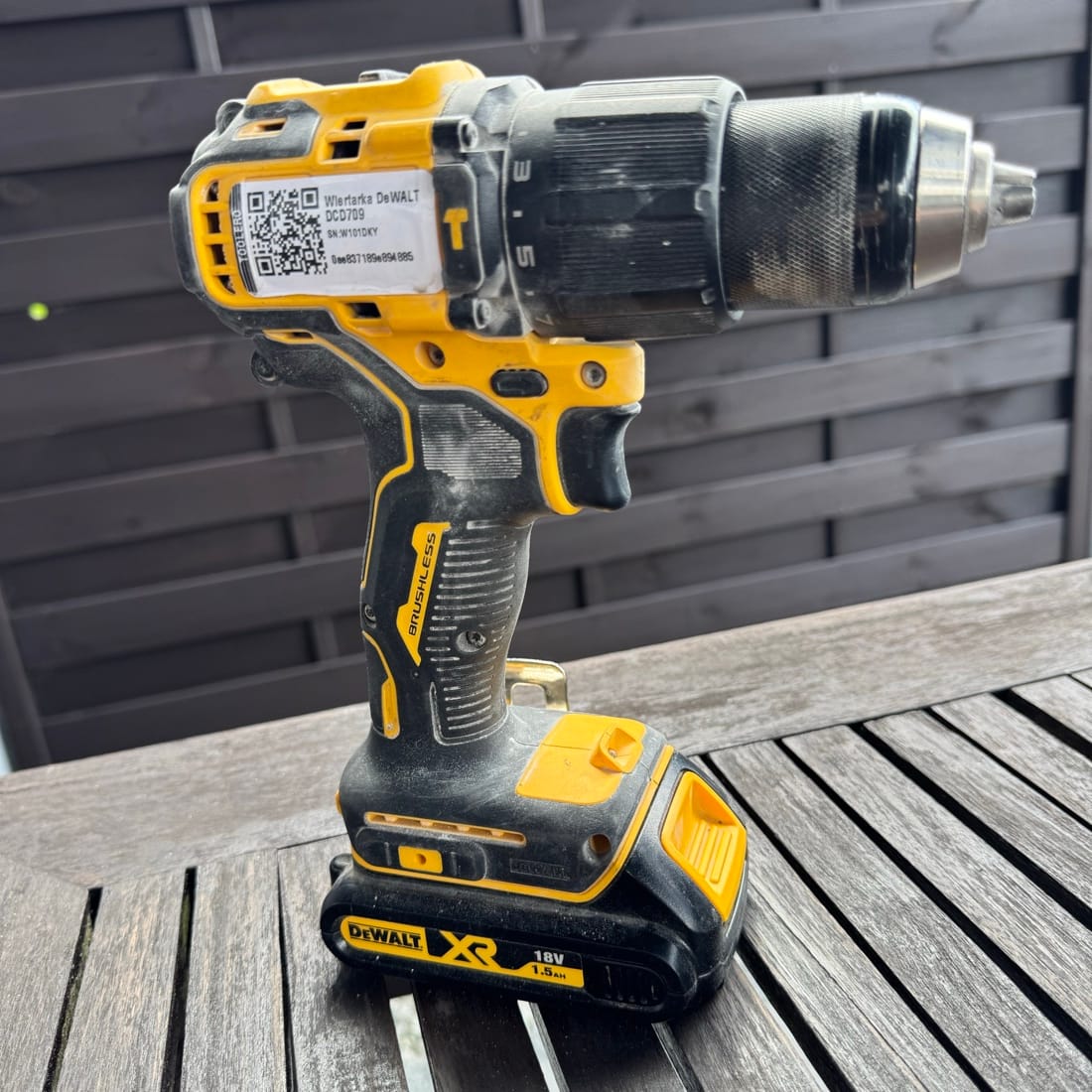
Label tools with QR codes and scan with your phone. Know in seconds who has the equipment, since when, and when it's due back. No expensive RFID readers, no special hardware.
Free QR label generation. Setup in 15 minutes.
Why QR codes instead of RFID?
Simpler, cheaper, and equally effective solution for tool control.
Just use your phone
Every smartphone scans QR codes. No readers to buy, no training needed - just scan.
10x lower cost
RFID means thousands on readers and tags. Generate QR codes for free and print on a regular printer.
Instant start
Print labels, stick on tools, start scanning. Setup in 15 minutes, not 15 days.
Durable labels
Laminated labels withstand tough conditions on construction sites, workshops, and production floors.
How do QR codes work in Toolero?
Three simple steps to full tool control.
1. Generate labels
Add tools to the system and generate QR labels. Print single labels or A4 sheets.
2. Stick on tools
Stick labels on tools. Laminated labels are resistant to water, dirt, and mechanical damage.
3. Scan and control
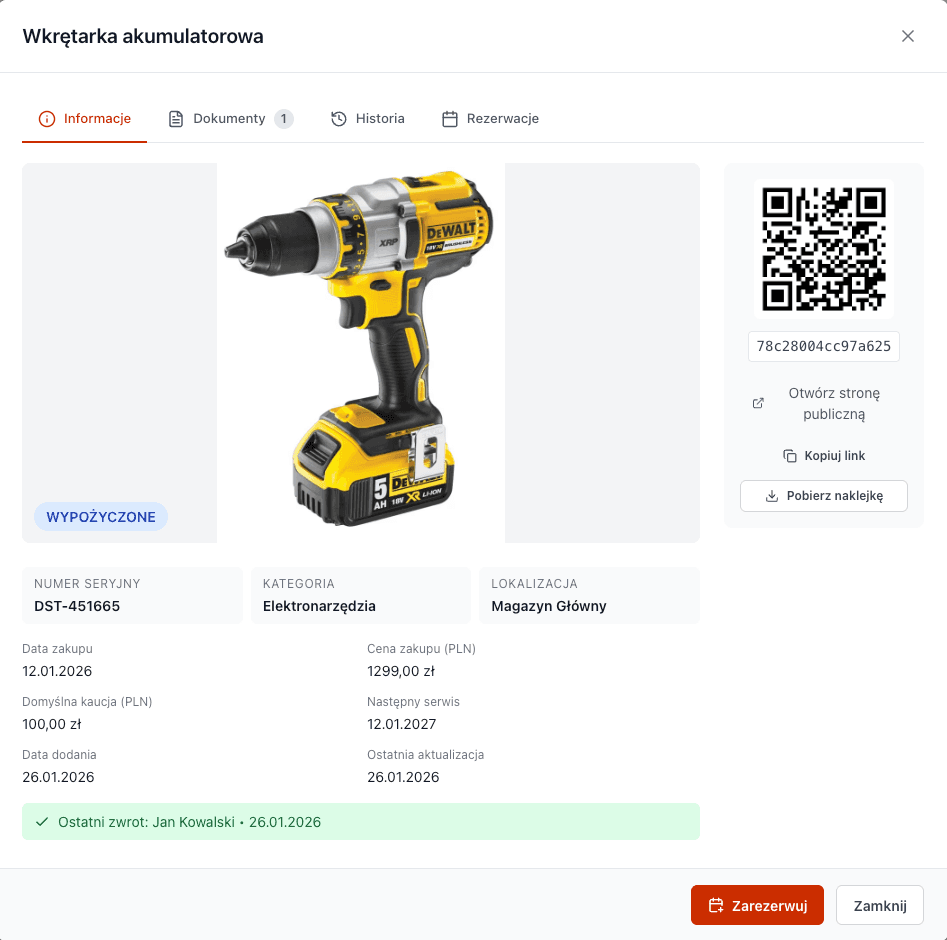
Scan QR code with your phone. Instantly see: who has the tool, since when, when it returns, condition.
What do you see after scanning a QR code?
Complete tool information in one scan.
- Current status: available / rented / in service
- Who has the tool and contact details
- Since when it's been rented
- Planned return date
- Full rental history
- Service and maintenance dates
- Notes and condition remarks
QR Codes vs RFID vs Excel
Compare tool inventory solutions.
| Feature | QR Codes (Toolero) | RFID System | Excel |
|---|---|---|---|
| Implementation cost | From 99 PLN/mo | 5000-50000 PLN | 0 PLN |
| Hardware | Phone / Tablet / Computer | RFID readers | Computer |
| Training | 5 minutes | Several days | Hours |
| Real-time data | |||
| Mobile access | Limited | Difficult | |
| Implementation time | 15 minutes | Weeks | Days |
Where do QR codes excel?
Ideal solution for various industries and applications.
Construction companies
Track tools across multiple sites. Scan QR on checkout and return - you always know where equipment is.
Manufacturing plants
Tool room inventory. Workers self-scan on checkout - no more queues.
Rental businesses
Customer scans code and sees user manual. You see who rented and when.
Frequently asked questions about QR codes
How durable are QR labels on tools?
QR labels generated in Toolero can be printed on laminated stickers that are resistant to dust, moisture and rain. They work well both in workshops and on outdoor construction sites. With a label printer or laminating film, stickers last for several years of intensive use.
What kind of printer do I need for QR labels?
A regular laser or inkjet printer is sufficient. You can print labels on self-adhesive A4 paper or use a label printer (e.g., Brother, Dymo). Toolero generates labels in print-ready formats - single labels or A4 sheets.
How many QR codes can I generate in Toolero?
QR code generation is unlimited in all plans. You can generate as many labels as you have tools in the system. Starter plan supports up to 50 tools, Business up to 150, and Enterprise has no limits.
What if a QR label gets damaged or peels off?
Simply generate and print a new label for the same tool. Tool data, rental history and all information remain unchanged in the system. The new label works identically to the previous one.
QR codes vs RFID - which is better for small businesses?
For companies with up to 500 tools, QR codes are clearly the better choice. RFID implementation costs 5,000-50,000 PLN for readers and tags, while QR codes are generated for free and scanned with a regular phone. QR provides the same benefits (identification, history, control) without hardware investment.
Start labeling tools with QR codes
Generate your first labels in 5 minutes. No credit card, no commitment.
Create account and generate labels7 days free. Unlimited label generation.