In 2026, every industry is talking about AI. Most conversations end with "a customer service chatbot" — which in independent rental shops is uniquely useless, because the customer wants to call anyway.
Meanwhile, the genuinely useful applications of AI in rental don't look like a chatbot. They look like the boring, daily processes you do manually today — assessing damage on a returned tool, figuring out who consistently brings equipment back dirty, guessing how many dethatchers to stock for next weekend.
Below are five areas where AI works today — without waiting for "2030" and without hiring a software team. From the simplest to the most advanced.
1. Seasonal demand forecasting — answering "how many units to buy"
This is the most boring and the most profitable application of AI in rental.
The question: how many dethatchers do I need for season 2026? Classic answer: "same as 2025, maybe one more." That's intuition, not analysis. AI gives you a hard answer based on data.
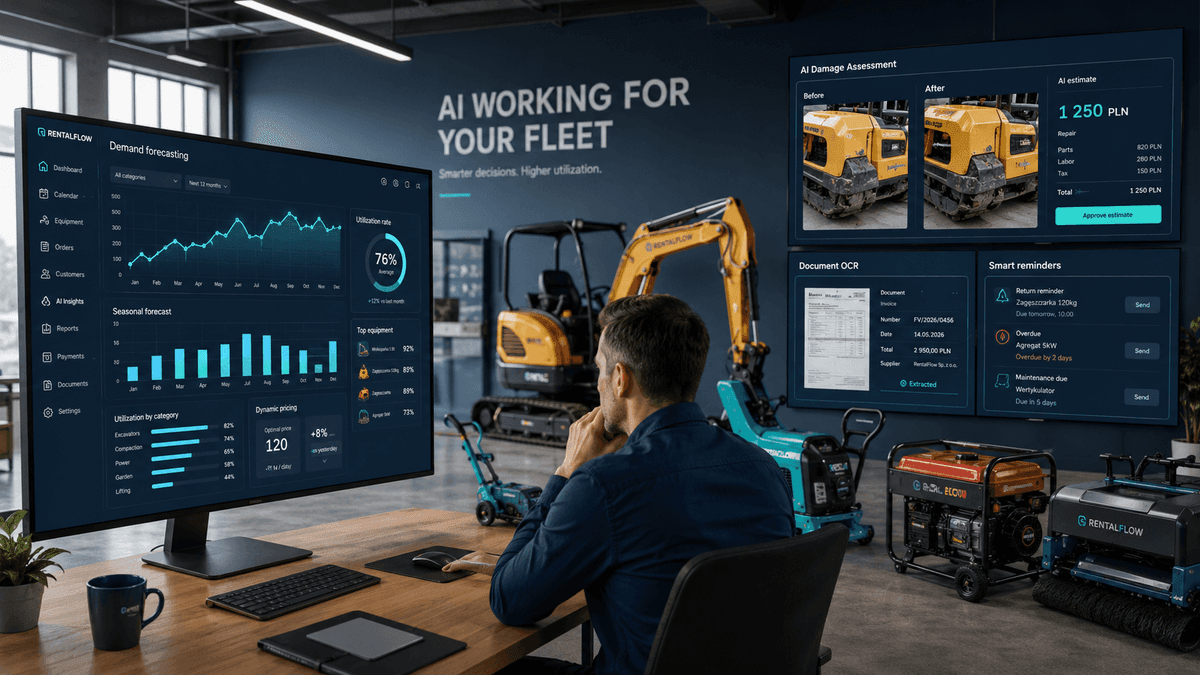
The algorithm learns from rental history (days, hours, seasonality, weather, holidays) and predicts how demand will distribute across the next season. Not as a guess — with confidence intervals: "in week 18, demand for dethatchers will be 35–42 rented-days, 80% probability."
What you get out of it:
- Optimal unit counts for each model that maximize revenue while minimizing dead stock
- Identification of equipment to sell — when forecasts show consistent year-over-year demand decline
- Signals on new categories — when demand grows in a category but you don't carry enough variants
Real benchmark: rental shops using demand forecasting raise utilization rate 10–18% within a year. Without buying new equipment — just by better matching their existing fleet to demand.
The simplest implementation: Excel with 24 months of history and basic linear regression. The most advanced: a dedicated machine learning model in your rental management system that updates predictions daily.
2. Automated damage assessment from photos
A customer returns a compactor with a cracked housing. Your employee looks at it, says "okay, that's a lot," calls service, waits for an estimate, debates with the customer, gets the deposit or doesn't. The whole process takes 3–5 days and often ends in dispute.
AI handles this in 30 seconds.
The employee photographs the damage. A vision algorithm compares the photo to the pre-rental state (another photo from the dispatch checklist). It identifies the damage type, locates it on a specific part, and — most importantly — cross-references a database of repair prices from previous service jobs. It outputs an estimated quote.
Benefits for the rental shop:
- Customer dispute based on facts — "the system estimates this repair at $120, here are two analogous cases from previous months"
- No waiting for service — you settle the deposit immediately on return
- Pricing consistency — the same damage type is always priced similarly, regardless of which employee is on duty
A full implementation requires a year of collecting photos and data. But partial automation — a "before/after" comparison with AI flagging the difference — works from month one. Without it, you're relying on the employee's memory of what the equipment looked like four days ago.
3. OCR for contracts, IDs, and protocols
A first-time customer walks in. Shows their driver's license. Your employee types in by hand their full name, license number, address. Time: 2–3 minutes. Errors: routine (typos, misread numbers).
OCR (Optical Character Recognition) with AI is a solved problem in 2026. The employee's phone takes a photo of the ID without storing it (in line with privacy compliance) and automatically extracts the data into the form. The employee sees pre-filled fields, visually verifies against the document, clicks "save." The scan is immediately deleted — only the typed-in number and name remain in the database.
Time: 15 seconds. Errors: near zero.
Identical use cases:
- Scanning rental contracts (if you still operate on paper — and many shops do)
- Scanning service receipts and invoices — auto-entry of costs into your records
- Scanning return protocols — pulling signatures, dates, line-item lists
One smaller rental software vendor in the US has already deployed this in a pilot with five companies. Average time savings for admin staff: 3–4 hours per week per shop.
4. Smart return reminders — with personalized tone
Every rental has customers who return on time and customers who consistently run late. Classic reminders (SMS "return required by 6 p.m.") go out the same to everyone — and only work on the first group.
AI analyzes the specific customer's history and adapts:
- When to send — if a customer always returns in the morning, the reminder goes the previous evening. If last-minute — reminder 2 hours before due time.
- Tone of message — first-time customer gets a polite reminder. Customer with 5 late returns gets a firm message that mentions the late fee.
- Channel — one customer reads SMS, another only responds to phone calls, a third to email. The system learns this.
Average improvement in on-time returns: 15–25%. That's not just fewer phone calls — it's also lower lost-availability cost, because every day late is a customer who could have rented and didn't.
Here too, value starts at the basic level. A system that sends the same SMS but intelligently picks the moment delivers 60% of the value of full automation.
5. Pricing suggestions — dynamic pricing for rental
Airlines and hotels figured out long ago that the same room on Saturday should cost 30% more than on Tuesday. In rental, 99% of independent shops still have one rate for all days and all customers.
That means leaving money on the table.
AI in dynamic pricing analyzes:
- Day of week and time — Saturday morning is peak for garden equipment, Wednesday is the trough
- Remaining availability — when 2 dethatchers remain across 5 inquiries, the price climbs
- Local seasonality — wedding peak near Atlanta starts mid-May, near Phoenix peaks earlier
- Forecast weather — rainy weekend = lower garden equipment demand = price reduction
The point isn't random price jumps. It's 2–4 price tiers for typical models:
- Base price (Mon–Thu)
- Weekend price (Fri–Sun)
- Premium price (peak season)
- Promotional (when utilization drops below threshold)
Dynamic pricing systems are starting to appear in rental management tools. They work best in combination with demand forecasting — because without a forecast, you don't know when to raise prices and when to drop them.
What AI in rental won't do for you
All the above applications share one limitation: AI works on data you don't yet have.
Demand forecasting requires 24+ months of rental history. Damage assessment needs hundreds of before/after photo pairs. Smart reminders learn on at least 6 months of customer interactions. Dynamic pricing needs a stable utilization measurement.
If you're running rentals in Excel without a digital rental history, none of these applications will work in your first year. AI doesn't invent your data. It can only extract more from it than you'd notice yourself.
Which means investment in AI starts with investment in process digitization. First an online reservation system, then inventory tracking, then deposits, then return protocols — all in digital form. After a year of data collection, AI finally has something to work with.
Three things to do this week
If you're reading this and thinking "great, but I don't know where to start" — here's the simplest plan:
1. Audit how much data you collect digitally. Rentals in a system? Real-time inventory? Service history? The more digital, the faster you'll get any value out of any AI tool.
2. Turn on the simplest "AI" — a demand calendar. If your system has reports with rentals per day, start tracking rentals per machine per week in Excel. After 12 weeks you have a baseline forecast for your own use.
3. Collect equipment-condition photos — before and after each rental. Even if you're not using any AI today, those photos are fuel for automation in a year or two. Without them, you start from zero.
Does a rental shop have to use AI in 2026?
No. But a rental shop that starts using these tools in 2026, by 2028 will have a two-year data history advantage the competition can't replicate. This isn't a fad. This is infrastructure that builds gradually.
The simplest AI implementations in rental don't require budget. They require consistency in data collection and openness to tools that analyze that data for you.
The final question isn't "should I use AI." It's: do you have data that AI could work on?
If you want your rental to accumulate data that's ready for AI analysis — start with a system that collects it automatically. Toolero logs every rental, every service, and every return, so your history is ready for further automation.